Event planning software, for a DJ, is the booking, the run of show, and the music in one place. Events Manager is that. Each gig is an event: a title, a category, a start and an end, a location, a contact, notes, and boxes. A calendar shows what is coming. The playlist for that night hangs on the event, not in a folder named after the client.
It is not a seating chart. It is not invoices or RSVPs. It is the DJ's half of planning: when, where, who, what must play, what must not, and the timeline. Wedding, party, corporate, graduation — same event object, different boxes.
Open Event Editor. You fill in the job the way a planner talks, not the way a crate is named.
Then you hang boxes and notes on that event the same way a collection holds them. Cocktail hour is a box. First dance is a box. The corporate do-not-play list is a box used as NOT. The event is the booking. The boxes are the music for that booking.
Hang boxes on the event the same way a collection holds them. Cocktail hour is a box. First dance is a box. The corporate do-not-play list is a box used as NOT. The event is the booking. The boxes are the music for that booking.
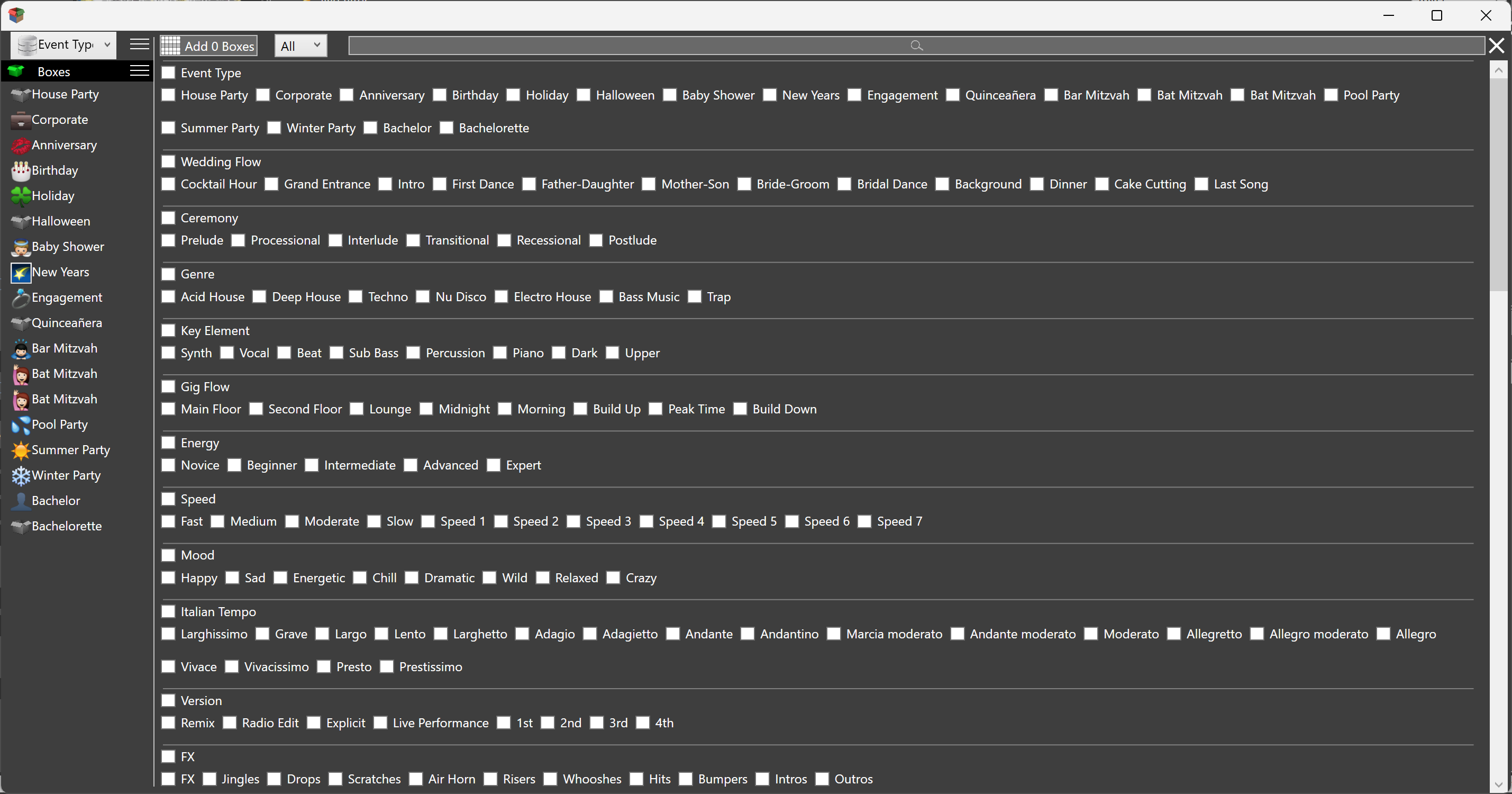
Use the Box Wizard for the kind of job: wedding flow (prelude, processional, cocktail, grand entrance, first dance, father-daughter, mother-son, dinner, cake, last song), house party, corporate, birthday, anniversary, engagement, pool, bachelor, bar or bat mitzvah. Those boxes already have names and icons. You fill them. You do not invent a folder tree per client.
The booking is a file. Open Saturday's event and the title, times, location, notes, boxes and playlists are there. You do not rebuild the gig from a folder named after the client. Take the file to the gig. Open it. Play.
The playlist for that night hangs on the event. Ceremony, dinner, dancing — lists on this booking, not in a crate you have to remember to open. M3U lists can come in. The event still holds its own. When you open the event, the lists for that night are there.
Put the run of show in the event's notes. Load-in, power, do-not-plays, the MC's name, the hard out. A note can also be a list of searches: one line, first match, or click a row and search the library. Save, edit, add, delete like Notepad. When you open Saturday, the words from the planning meeting are still there.
A song can carry a note that belongs to this gig, not to every gig. First dance at this wedding. The host's shout-out at this party. The track still has its own song note across the library; the event note on the song is only for this booking. Open the event and that line is there with the track.
The calendar is upcoming gigs. Make the event when the date is booked. Status Tentative until the deposit lands, then Confirmed. Set the alert so Friday's load-in is not a surprise. On the night, open the event from the calendar. History is a different calendar: two hundred weeks of what you already played. Do not mix them. Planning looks forward. Sessions look back. See Calendar History.
Holidays Editor sits next to Events Manager. Recurring dates you care about as a DJ — New Year, a local festival — are not the same as a Saturday booking. They still belong on a calendar you open in the same app.
Events publish as an iCalendar feed named PowerBox DJ Calendar. Subscribe once from Google Calendar (From URL), iOS Subscribed Calendar, or Outlook Subscribe from web. The phone cannot write back. Edits stay in the app. Sign in at Settings ▸ Account for the subscribe link.
It does not invoice. It does not collect RSVPs. It does not draw tables. Planners who need that keep the planner tool. The DJ still needs the booking, the list, and the notes in the player. That is the split. PowerBox DJ is the DJ side.