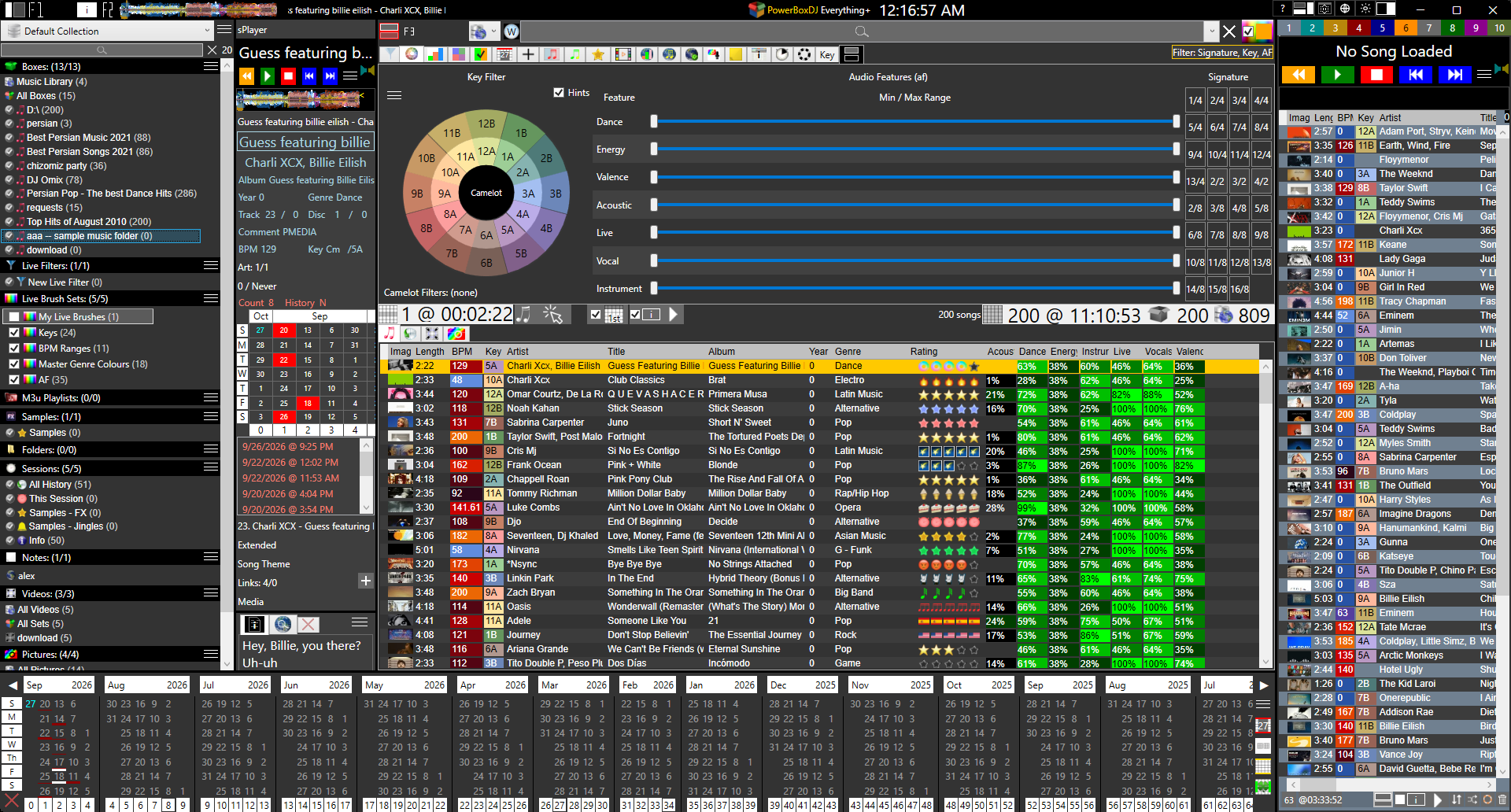
DJ software for mobile DJs and wedding DJs. Library and Full DJ Decks. The full page.
1. Collections: Setup as many music categories you want. Use Wizard to speed up process.
2. Boxes: Add music to specific boxes
3. Filter: Set custom or use Boxes as a filter with OR, AND, NOT, ADD
Extras..
4. Live Brushes: Set custom filters to highlight specific parts of a song like Key, Genre, or Album
See the music. Understand the music.
High Quality: 2,4,6 OR Fast (Low Quality): 2,4,5.
Per Stem
Stem Seek: Select 1 stem to temporarily seek forward and preview song.
The library and Full DJ Decks are the same application. That is PowerBox DJ for a mobile DJ: find the track, play it, no second program. Beatmatching, stems, hot cues, scratch, karaoke, video, and wedding flow sit in that one app.
Column View: Statistics for Songs and Sessions
Collections Viewer: See/Edit collections with selected song(s)
Sidelists: 2 columns of unlimited side lists
Relative Songs: Find similar songs to selected song based on custom relative criteria
Internet Charts: Compare your local files to Playlists and Top Charts from Spotify, Apple, and Deezer
Internet Song Data: Auto pull song data for selected song.
Watches: Unlimited custom timers and count downs for any purpose.
BPM and key in the library. Circle of Fifths, Open Key with offset, sharp and flat auto measure. That is harmonic mixing: analyze, then click neighbours. The Key Filter does not auto-build the playlist.
DJ: Traditional DJ Decks with all the tools and then some
Playlist: Single player with a list of ordered songs to play
3rd Party: Auto Resize to a small square on mouse leave and show when mouse hovers.
Built in Google Translator for entire app to any language.
Available in free package.
Day or Night with a tint slider for Text and another slider for Background.
PowerBox DJ uses Collections as a set of workspace. In it, you can show/hide the types of collections to see work with.
Collections are very customizable and are completely open to using them however you want.
Have a collection just for a Wedding Ceremony, and another just for Wedding Receptions.
Boxes are named lists of songs. They are not only crates. A box can filter the whole library: songs in this box or that one, songs in this and that, songs not in this, or add songs from a box before you search. Say what a song is once. Then work on one set of music without touching the rest of the library.
A collection is not only boxes. Filter sets, live brushes, M3U playlists, sample sets, favorite folders, sessions, notes, videos, and pictures all live there. The system is organized, not just the files.
PowerBox DJ is built as a powerful engine. Extensive development has gone into making the software robust, stable, and crash-resistant under real-world use. Special care has been taken to ensure the software can constantly keep up with the latest technology. The system is built to expand and is continually expanding. Performance remains responsive as collections grow beyond the limits of most music software.
DJ software for mobile DJs and wedding DJs. Library and Full DJ Decks. Events Manager holds the booking.
Yes. No sign up, no credit card, no time limit. Subscriptions add a full DJ deck and other enhanced tools, bought inside the app.
All-in-one software that already sits with the rest of their music. Library, decks, and the gig are the same app — find the track and play it without a second program.
Events Manager is the timeline, the DJ flow, and the per-task plan. Each task on the night gets its music and a short note per song — Ceremony 1: John and Jane — so the run of show and the tracks live on the same event.
Preset lists of music categories, plus a Master Genre list that auto-assigns a master genre to the sub-genres you choose. Analyzers score Valence, Energy, Danceability, Acoustic, Instruments, and Live performance so class music is picked by feel, not filename.
Karaoke songs sit in the same library. Stem separation pulls Vocals, Drums, Bass, Guitar, Piano, and Others so you can drop the vocal. Lyrics lookup from the internet, then a word analyzer syncs the words to the screen with a count-off.
Yes. Find the track and play it without a second program.
Enhanced tools: a full DJ deck that's easy to use with a mouse, stems, analysis, charts, and more.
No. fPlayer is a mouse deck. It is not DVS. Controllers are not required.
Download and use it. No signup. No registration. No credit card. No time limit. A small online installer, or a full offline installer.
Subscriptions add enhanced tools — a full DJ deck, stems, analysis, charts. You pay inside the app. You pick a cycle. You can change it, move the licence, or cancel from your account. Updates are released often. The app stays up to date on its own.