Simple Player
Audio player with basic controls.
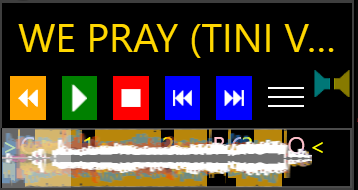
Simple Player plays the playlist. Full DJ Deck is the deck those buttons play through.
The song name sits on top. Hover a name that is cut off and the full name shows.
The orange button steps back to the previous cue on the wave. Hot cues and the start and end cues are on that wave, and the start of the song is the first cue. Each press walks back one cue.
Green plays and pauses. Red stops. Blue previous plays the previous song. Blue next plays the next song. On the playlist, next takes the song at the top of the list. With Mix Next, next mixes into that song.
The two meters are the left and right level.
The wave under the buttons is the same overview Full DJ Deck draws. Each stem has its own layer. The hot cues sit on the wave, and the white bar is the playhead. Click or drag the wave to move inside the song.
Show Full Player in the menu opens Full DJ Deck under Simple Player. Auto Show opens the deck when the pointer moves on the wave. Auto Hide closes the deck when the pointer leaves it.
It mirrors the player that is actually playing.
It shows the wave and the cues, the overview progress, the VU meters, the song name, and the same five transport buttons as Simple Player: restart, play and pause, stop, previous, and next. It starts on the info player. When a playlist deck starts playing, it follows that deck. It mirrors the stem order of the deck it is following.
It sits in the window header, to the left of the centered wordmark. Click the wave to move inside the song. The sound stays on the deck Preview Player is following.
Related